


Content
Attackers are constantly looking for ways to inject malware into systems and execute it profitably without raising the suspicion of security solutions or users. This article explains how various methods interact, how different browsers handle their cache, and why this is relevant to defense.
What is browser cache smuggling?
Browser cache smuggling refers to a technique in which malicious files are secretly stored in a system’s browser cache. Every browser temporarily stores content from visited websites, such as images or scripts, to load pages faster the next time they are visited. This technique exploits this mechanism: Instead of having the user consciously download a file, the files are smuggled into the cache-folder when the page is loaded.
From there, they can be reused later.
On its own, this doesn’t cause any harm. However, when combined with other techniques, it becomes a way to compromise systems.
What is ClickFix?
ClickFix is a social engineering technique.
In this type of attack, the user is tricked into taking action via a malicious website or a fake error message. Typically, the user is instructed to copy a specific command and execute it on their system. For example, to fix a supposed problem or pass a security check. The attack deliberately relies on the user’s trust and cooperation. If the user executes the command, they trigger the actual malicious action themselves.
When combined with browser cache smuggling, this results in a particularly stealthy method: The malware is stored in the cache directory as soon as the malicious page is loaded. Afterward, the command planted via ClickFix is all that’s needed to execute this file from the cache. No visible download takes place.
What challenges do attackers face
Potential attackers face several obstacles in this process:
- What browser does the target use?
- How and where in the file system does it store its cache files?
- How can the correct file in the cache directory be uniquely identified and reused?
How Browsers Handle the Cache
For illustrative purposes, we will consider Microsoft Edge as a representative of Chromium-based browsers on Windows, as well as Mozilla Firefox.
Microsoft Edge / Chromium
When a user visits a website, Edge stores its content, such as images, in a cache folder:
| C:\Users\<Username>\AppData\Local\Microsoft\Edge\User Data\Default\Cache\Cache_Data |
For example, if we visit the page https://www.secuinfra.com/de/company/, the images embedded there can be found in the cache.
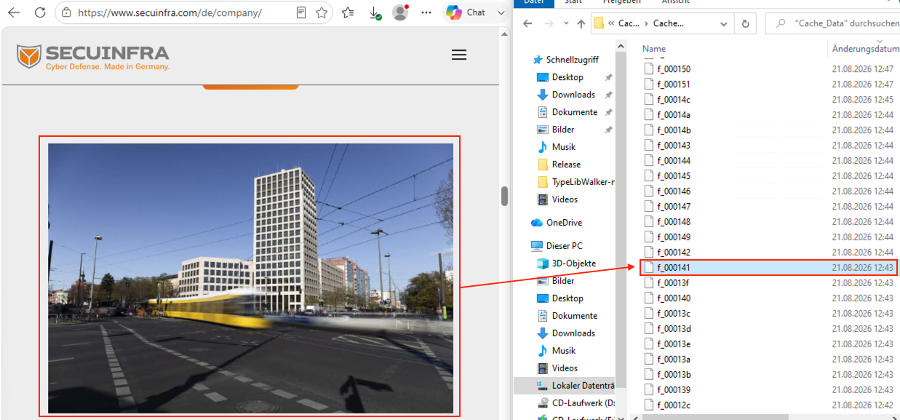
If we assign the correct file extension, the file can be opened and viewed as usual.
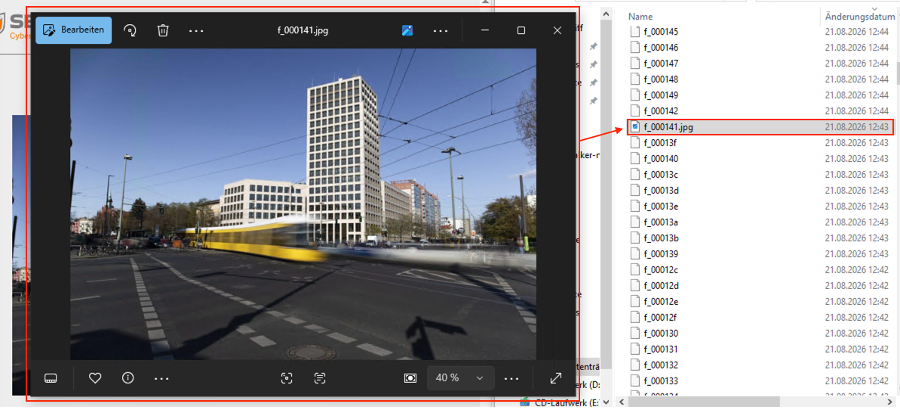
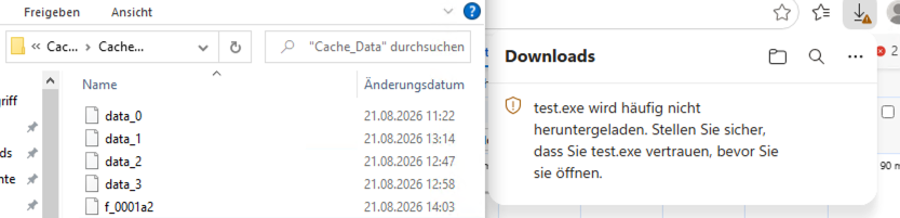
TThere are differences depending on the file type. Depending on its internal storage logic, Chromium saves resources such as images either as standalone files with the naming convention f_###### or bundled in the block files data_0 through data_3. For example, if we try to recover an EXE or DLL file this way, it does not appear as an f_-file, but rather in the data_-files. To access this content, you would have to edit the cache database directly. This is a time-consuming process and requires that the browser process isn’t running.
SECUINFRA’s Red Team observed that this behavior can be influenced by two factors: the file extension and the way the file is embedded in the page.
If we embed a valid image in a simple HTML page, we can then interact directly with the corresponding file in the cache:
| <html> <body> <b>Please Visit ME</b> <img src=”picture.jpg “> </body> </html> |
As expected, the image file is saved as an f_-file.
The situation is different with application files:
| <html> <body> <b>Please Visit ME</b> <img src=”test.exe”> </body> </html> |
So, while it is downloaded over the network, it is not stored in a part of the cache that we can access directly.
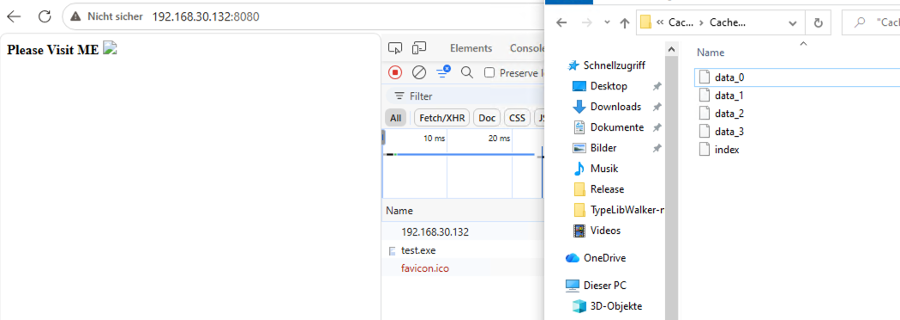
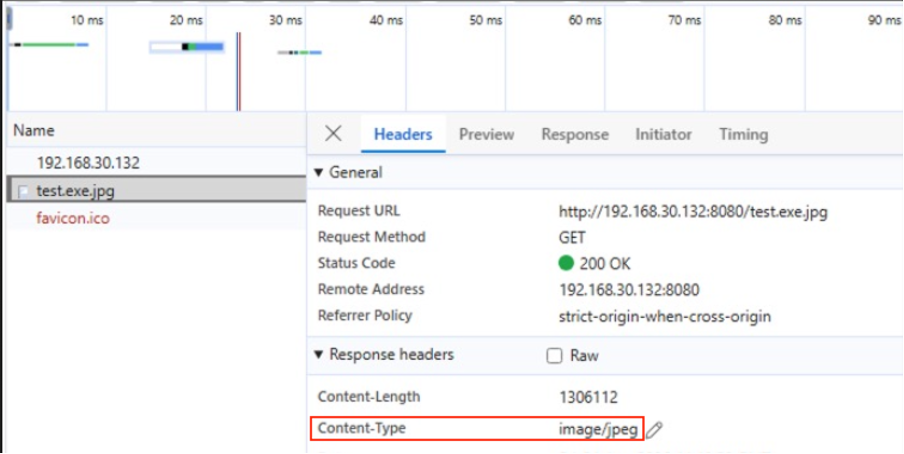
Renaming it to test.exe.jpg and including it, using the <img>-tag, also does not work. Direct access to the file is still not possible:
| <html> <body> <b>Please Visit ME</b> <img src=”test.exe.jpg”> </body> </html> |
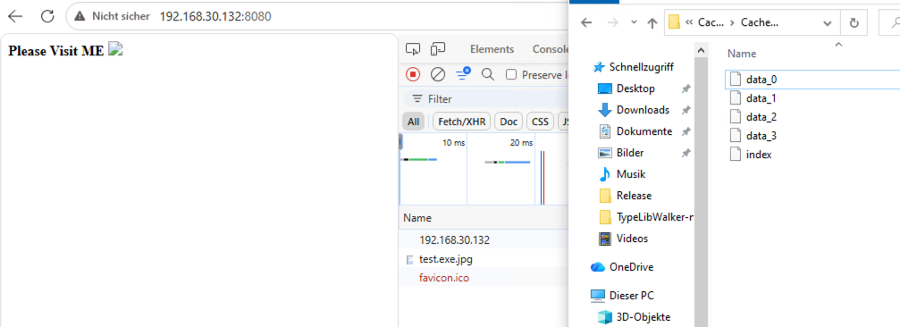
Although the changed extension affects the Content-Type reported by the server, it does not change how the file is stored in the hard-to-reach cache area.
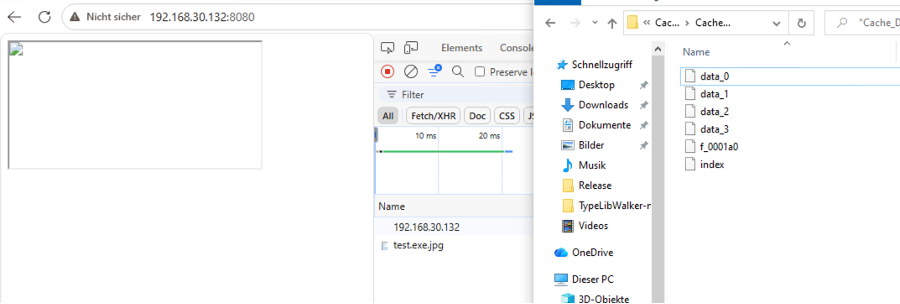
SECUINFRA’s Red Team was able to bypass this restriction by loading the file as an embedded resource via an <iframe> instead:
| <html> <iframe src=”test.exe.jpg”></iframe> </html> |
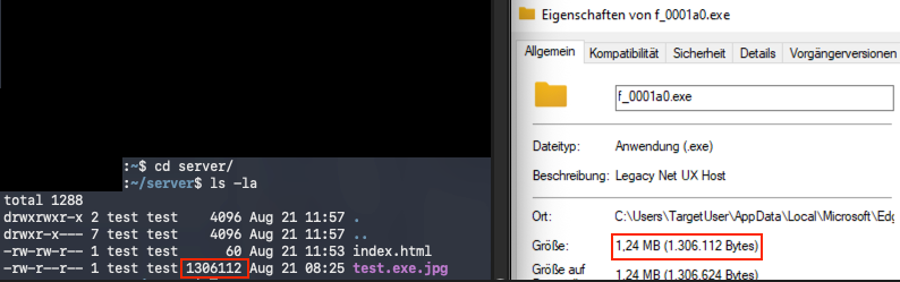
As a result, the application, disguised as an image, ends up in the cache as an f_-file and can be reused. If the .exe file extension is added, it is once again clearly recognizable as an executable application. Its contents and size match exactly those of the file on the web server.
If the application gets embedded as an unmasked EXE file via an <iframe>, it works essentially the same way. The difference is that the user is notified of the download and, depending on the file type and source, may be warned.
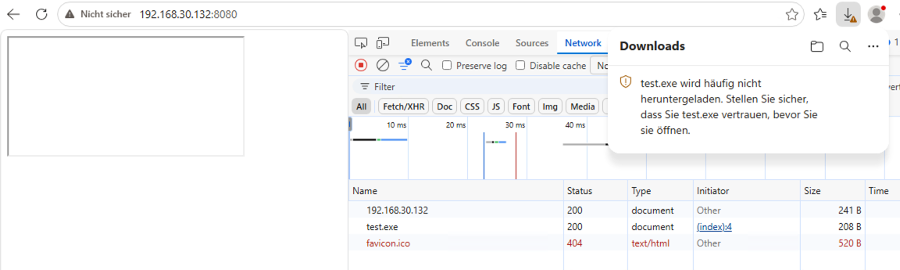
Although the result is similarly profitable and the file is accessible, the potential, visible indicators make this approach more suspicious.
Mozilla Firefox
IIn Firefox, cache management works a little differently. The cache files are located in the following directory:
| C:\Users\<Username>\AppData\Local\Mozilla\Firefox\Profiles\<Profil>.default-release\cache2\entries |
The files are stored there under a unique hash. What makes this special is that this name is derived from various properties and is therefore identical regardless of the system or operating system.
This time, we’ll use the banner from the website https://www.secuinfra.com/de/company/ as an example – once on Windows and once on MacOS. In each case, it is stored in the cache under the same hash.
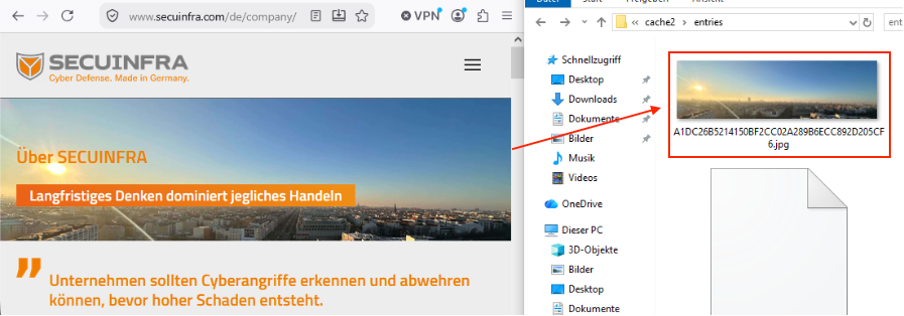
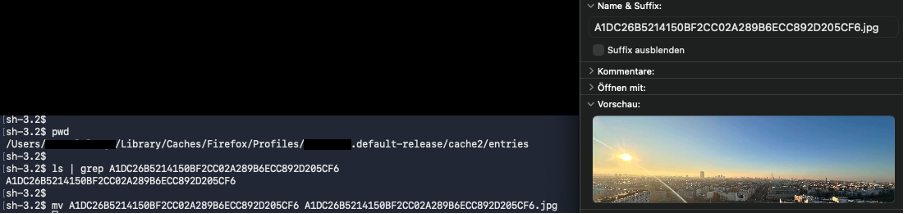
This means attackers can search specifically for their file. Simply adding the correct file extension like before, is enough to make the image visible and usable again.
Integration with ClickFix
So how can this behavior be exploited? This is where ClickFix comes into play. The appeal for attackers lies in three factors: simply visiting a website is enough, there is no obvious download, and the file ends up in a predictable location.
The attacker’s site can easily detect which browser a visitor is using and display the appropriate content and command:
| <script> const userAgent = navigator.userAgent; if (userAgent.includes(“Edg/”)) { // -> Edge-specific payload } else if (userAgent.includes(“Firefox/”)) { // -> Firefox-specific payload } else { testText.textContent = “Not supported.”; } </script> |
However, placing the file in the cache is only one part of the attack chain. The attacker must then ensure that file X in the cache directory of browser Y is actually executed via an appropriate command – for example, by using social engineering to trick the victim into executing it.
If the user is tricked into entering and executing customized commands, this creates a chain of attacks that can be demonstrated using a harmless example.
Let’s open the page https://www.secuinfra.com/de/company/ in Firefox (as of September 2, 2026), open CMD.exe in Windows (Windows key + R ->, type “cmd,” and press ENTER), and insert the following command:
for /r "%LOCALAPPDATA%\Mozilla\Firefox\Profiles" %F in (A1DC26B5214150BF2CC02A289B6ECC892D205CF6) do move "%F" A1DC26B5214150BF2CC02A289B6ECC892D205CF6.png && A1DC26B5214150BF2CC02A289B6ECC892D205CF6.pngThe following happens:
- The image file is loaded into the cache when the page is loaded
- The user executes the specified command
- The image file is searched for in the directory, renamed, moved to the current folder, and opened.
Commands like these – and even much more sophisticated ones – can be easily embedded by attackers into their own pages:
| <html> <body> <b> Copy the command and execute it please! </b> <button onclick=”copyText()”>Copy Command</button> <script> function copyText() { navigator.clipboard.writeText(“This could be your command.”); } </script> </body> </html> |
From here on out, the only thing left to do is develop a scenario, conceal actions as effectively as possible, and tailor payloads to the target. There are virtually no limits to creativity here.
But how can this behavior be made more difficult, prevented, or monitored?
Recommendations
To make ClickFix attacks more difficult, there are various measures available that can complement and reinforce one another.
Social engineering
Regular ClickFix training and awareness campaigns are among the most important measures for preventing attacks. In particular, users should learn:
- Do not copy and run commands from websites in PowerShell, the Terminal, or via Win+R.
- Recognize fake CAPTCHAs and “Verify you are human” prompts as potential warning signs. In particular, you should be wary if a website, as part of a supposed CAPTCHA, asks you to copy commands, open Win+R, or use PowerShell or the Terminal.
- A website should never ask you to carry out commands to fix a supposed technical problem.
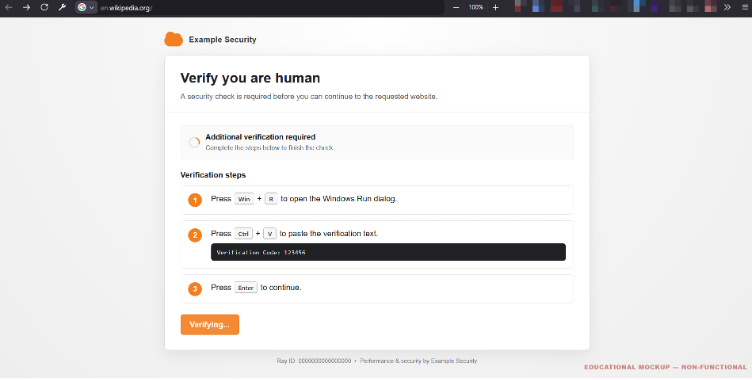
https://commons.wikimedia.org/wiki/File%3AClickFix_Example_English.png?utm_source=chatgpt.com (CC0)
It is particularly important to understand these attempts at manipulation, since ClickFix is designed to exploit legitimate user actions.
Restrict Programs from Executing Code
There are several technical measures that can be used to make it more difficult for users to inadvertently execute malicious code:
- Restrictions on UI input interfaces: Blocking the Run dialog (Win + R) and command execution via the Explorer address bar. This makes social engineering attacks (such as ClickFix) more difficult, in which users are tricked into manually pasting copied commands into Shell input fields.
- Application Control: Here, you can specify which programs or executable files users are allowed to run. For example, access to powershell.exe, cmd.exe, or rundll32.exe could be restricted for certain user groups, if possible.
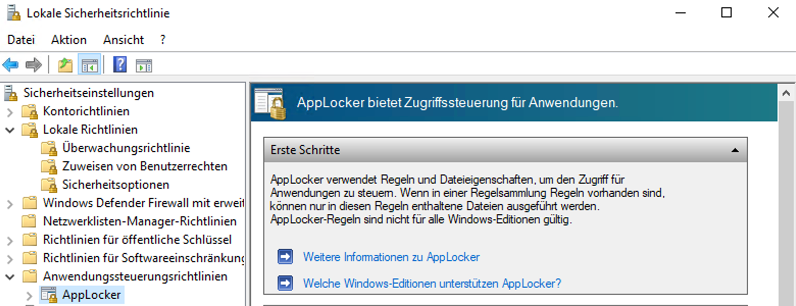
- Prevent untrusted content from user directories: The execution of untrusted programs from directories such as Downloads or %AppData% can also be restricted by Application Control rules. This makes it more difficult for attackers to directly execute malware stored in those locations.
- PowerShell Constrained Language Mode: PowerShell can still be used in this mode, but certain advanced features – such as direct access to .NET and COM interfaces – are restricted.
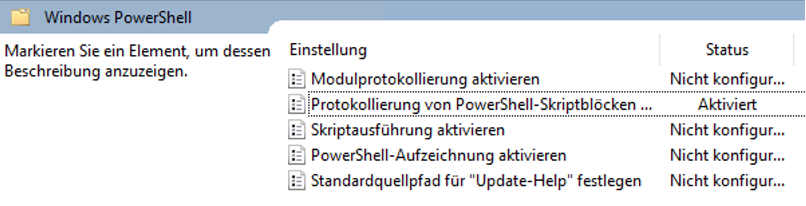
- Enable PowerShell Script Block Logging: This allows PowerShell commands to be logged and analyzed later. This makes it easier to detect and investigate attacks.
Pop-ups & Alerts
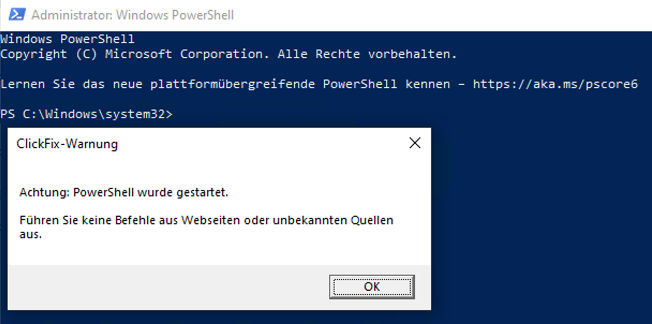
Another option is a warning message that appears, for example, when PowerShell is launched. This could alert users to the risk of ClickFix attacks and social engineering. For experienced user groups, an option could be provided to hide the warning so as not to unnecessarily disrupt their workflow.
A reminder like this can prompt users to reconsider their actions before executing a command.
Network Layer
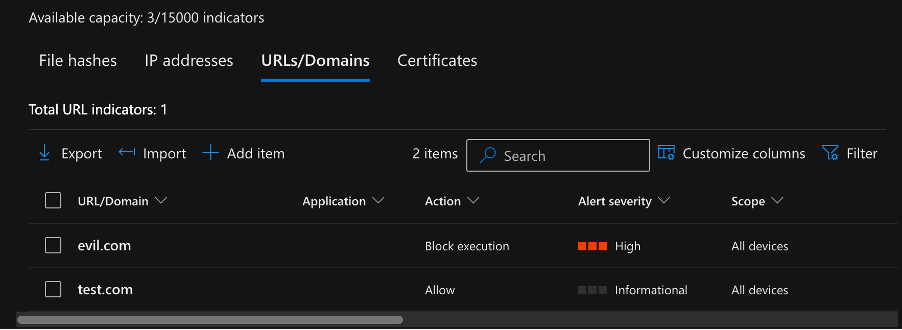
Even if an attacker successfully executes a ClickFix command, the attack can still be stopped if the connection to a malicious domain is blocked early on. Known malicious domains can be blocked, for example, through DNS, web, or EDR protection. In addition, reputation- and behavior-based mechanisms can detect connections to previously unknown, suspicious domains.
Endpoint Detection & Response (EDR)
The behavior of EDR solutions varies along the ClickFix attack chain:
- Cache Storage & Write Accesses: When the browser simply writes to the f_###### files, EDR sensors filter this out as normal cache noise and typically do not log it or trigger an alert.
- Reading the cache file: Simply reading (FileRead) the f_###### file from the cache directory using a script interpreter (powershell.exe, cmd.exe) leaves no telemetry traces with default EDR settings.
- Copying / Creating the Target Payload: Technically, the copying process consists of reading and writing. While the read operation from the source remains undetected in the cache, the EDR logs the creation of the new target file (e.g., FileCreated for %TEMP%\evil.exe). However, the reference to the source file from the browser cache is lost in the EDR telemetry.
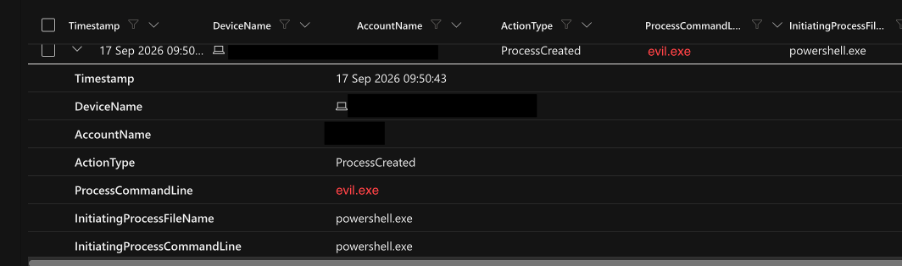
- Execution & Process Chain: As soon as the file copied from the cache (e.g., %TEMP%\evil.exe) is launched, the EDR detects the execution and the parent-child process relationship (powershell.exe -> evil.exe) via a ProcessCreated event (DeviceProcessEvents).
SIEM, Detection Engineering & System Auditing
Since EDR telemetry does not provide a complete picture of individual steps in the attack chain, detection can be supplemented with additional Windows auditing and correlation:
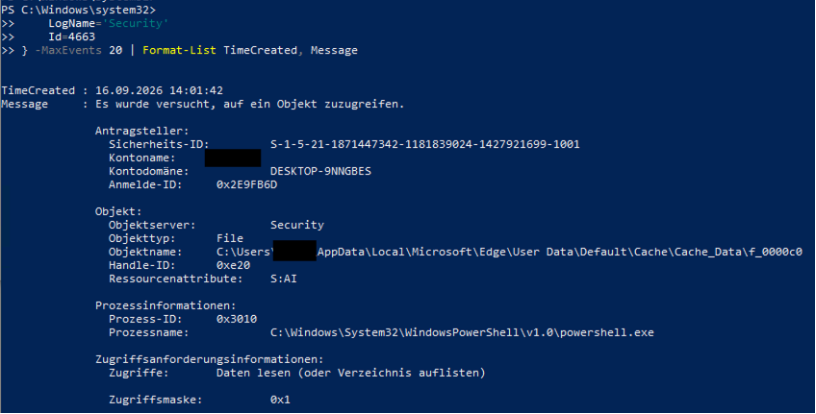
- Windows Event ID 4663: By applying a SACL to the browser cache directory and enabling file system auditing, access to cache files can be logged in greater detail. Both read and write accesses can be logged. In our test, read and write accesses by powershell.exe were logged as Event ID 4663. Even legitimate write accesses to the cache by the browser can generally be subject to monitoring, which is why individual cache accesses alone do not constitute a clear indication of an attack. Accesses by unexpected processes such as powershell.exe or cmd.exe are more indicative of a potential issue.
- Correlation of the attack chain: SIEM rules can correlate a cache access by a script interpreter with subsequent file operations and a follow-up execution. This makes it possible to detect the attack chain even if individual steps are not detected by the EDR.
- PowerShell Script Block Analysis: Additionally, PowerShell script block logs and process data can be examined for access to browser cache directories, as well as for the subsequent copying, modification, or execution of files. In particular, detection should take into account the accessing process, the access to the browser cache directory, and subsequent file or process activities.
Reference:
Think before you Click(Fix): Analyzing the ClickFix social engineering technique
